In this post we will add and delete firewall rules associated with Database server in SQL Azure programmatically.
Read part 1 of this post here. In part 1, we fetched SQL Azure firewall rules programmatically.
In this post I am going to add two functions in existing Firewall class.
1. Adding function to add firewall rule.
2. Adding function to delete firewall rule.
Adding firewall rule
We will use stored procedure sp_set_firewall_rule to add a firewall rule. This is default stored procedure provided by API.

We are using usual ADO.Net operations to call the stored procedure.
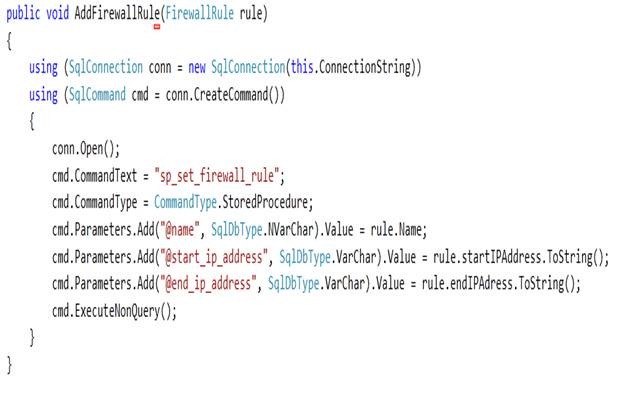
As input parameter we are passing object of firewallrule.
Deleting firewall rule
We will use API provided stored procedure sp_delete_firewall_rule to delete a firewall rule.

We are using usual ADO.Net operations to call the stored procedure.

We are passing name of the firewall rule to delete.
Full code for Firewall class is as below,
Firewall.cs
using System;
using System.Collections.Generic;
using System.Linq;
using System.Text;
using System.Data;
using System.Data.SqlClient;

namespace ConsoleApplication15
{
 public class Firewall
 {

public string Login { get; set; }
 public string Password { get; set; }
 public string ServerName { get; set; }
 public string ConnectionString { get; set; }

public Firewall(string login, string password, string server)
 {
 this.ServerName = server;
 this.Login = login;
 this.Password = password;
 SqlConnectionStringBuilder connectionStringBuilder = new SqlConnectionStringBuilder();
 connectionStringBuilder.DataSource = string.Format(string.Format("tcp:{0}.database.windows.net,1433", ServerName));
 connectionStringBuilder.InitialCatalog = "master";
 connectionStringBuilder.UserID = this.Login;
 connectionStringBuilder.Password = this.Password;
 connectionStringBuilder.Pooling = true;
 this.ConnectionString = connectionStringBuilder.ToString();
 }

public List<FirewallRule> GetFireWallRules()
 {
 List<FirewallRule> lstFirewall = new List<FirewallRule>();
 using (SqlConnection conn = new SqlConnection(this.ConnectionString))
 {
 using (SqlCommand cmd = conn.CreateCommand())
 {
 conn.Open();
 cmd.CommandText = "select name , start_ip_address, end_ip_address FROM sys.FireWall_rules ";
 using (SqlDataReader reader = cmd.ExecuteReader())
 {
 while (reader.Read())
 {
 lstFirewall.Add(new FirewallRule(reader["name"] as string,
 reader["start_ip_address"] as string,
 reader["end_ip_address"] as string));
 }
 }
 }
 return lstFirewall;
 }
 }

public void AddFirewallRule(FirewallRule rule)
 {
 using (SqlConnection conn = new SqlConnection(this.ConnectionString))
 using (SqlCommand cmd = conn.CreateCommand())
 {
 conn.Open();
 cmd.CommandText = "sp_set_firewall_rule";
 cmd.CommandType = CommandType.StoredProcedure;
 cmd.Parameters.Add("@name", SqlDbType.NVarChar).Value = rule.Name;
 cmd.Parameters.Add("@start_ip_address", SqlDbType.VarChar).Value = rule.startIPAddress.ToString();
 cmd.Parameters.Add("@end_ip_address", SqlDbType.VarChar).Value = rule.endIPAdress.ToString();
 cmd.ExecuteNonQuery();
 }
 }

public void DeleteFirewallRule(string name)
 {
 using (SqlConnection conn = new SqlConnection(this.ConnectionString))
 using (SqlCommand cmd = conn.CreateCommand())
 {
 conn.Open();
 cmd.CommandText = "sp_delete_firewall_rule";
 cmd.CommandType = CommandType.StoredProcedure;
 cmd.Parameters.Add("@name", SqlDbType.NVarChar).Value = name;
 cmd.ExecuteNonQuery();
 }
 }
 }
}
We have FirewallRule and Firewall class in place. Now we need to call AddFireWallRule() and DeleteFirewallRule() function to perform add and delete operation of firewall rules.
Program.cs
using System;
namespace ConsoleApplication15
{
 class Program
 {
 static void Main(string[] args)
 {
 Firewall firewall = new Firewall("Your user Name", "Your Password ", "Your Server Name ");
 var result = firewall.GetFireWallRules();
 foreach (var r in result)
 {
 Console.WriteLine("Firewall Rule Name {0} : Start IP {1} , End IP {2}", r.Name, r.startIPAddress, r.endIPAdress);
 }
 Console.ReadKey(true);
 Console.WriteLine("After Adding Firewall rule named Test1");
 FirewallRule addfirewallrule = new FirewallRule("Test1", "14.99.157.99", "14.99.157.101");
 firewall.AddFirewallRule(addfirewallrule);
 var result1 = firewall.GetFireWallRules();
 foreach (var r in result1)
 {
 Console.WriteLine("Firewall Rule Name {0} : Start IP {1} , End IP {2}", r.Name, r.startIPAddress, r.endIPAdress);
 }
 Console.ReadKey(true);
 Console.WriteLine("After Deleting Firewall rule named Test1");
 firewall.DeleteFirewallRule("Test1");
 var result2 = firewall.GetFireWallRules();
 foreach (var r in result2)
 {
 Console.WriteLine("Firewall Rule Name {0} : Start IP {1} , End IP {2}", r.Name, r.startIPAddress, r.endIPAdress);
 }
 Console.ReadKey(true);
 }
 }
}
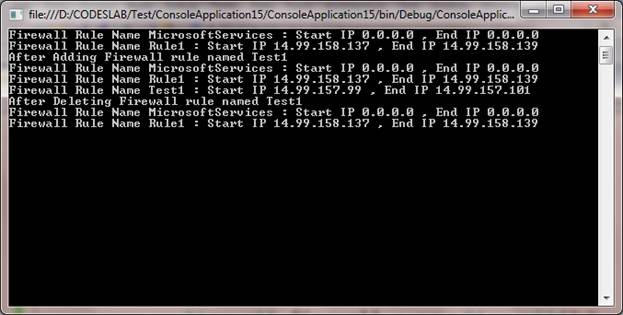
Press F5 to fetch, add and delete firewall rules,
Discover more from Dhananjay Kumar
Subscribe to get the latest posts sent to your email.


3 thoughts on “Adding and Deleting SQL Azure firewall rules programmatically”