In this post I will discuss how could be read XML file using LINQ. We will see some tips as well.
Let us say we have XML file as below, this file is stored on D drive. This XML contains information about books.
Data.Xml
<?xml version="1.0" encoding="utf-8" ?>
<catalog>
 <books>
<book id="bk101">
  <author id="1">Gambardella, Matthew</author>
  <title>XML Developer’s Guide</title>
  <genre>Computer</genre>
  <price>44.95</price>
  <publish_date>2000-10-01</publish_date>
   <description> An in-depth look at creating applications with XML.</description>
</book>
<book id="bk102">
  <author id="2">Ralls, Kim</author>
  <title>Midnight Rain</title>
  <genre>Fantasy</genre>
  <price>5.95</price>
  <publish_date>2000-12-16</publish_date>
  <description> A former architect battles corporate zombies,an evil sorceress, and her own childhood to become queen of the world.</description>
</book>
<book id="bk103">
  <author id="3">Corets, Eva</author>
  <title>Maeve Ascendant</title>
  <genre>Fantasy</genre>
    <price>5.95</price>
    <publish_date>2000-11-17</publish_date>
    <description>After the collapse of a nanotechnology society in England, the young survivors lay the foundation for a new society. </description>
  </book>

<book id="bk104">
    <author id="4">Corets, Eva</author>
    <title>Oberon’s Legacy</title>
    <genre>Fantasy</genre>
    <price>5.95</price>
    <publish_date>2001-03-10</publish_date>
    <description>In post-apocalypse England, the mysterious agent known only as Oberon helps to create a new life for the inhabitants of London. Sequel to Maeve Ascendant.</description>

  </book>

<book id="bk105">
    <author id="5">Corets, Eva</author>
    <title>The Sundered Grail</title>
    <genre>Fantasy</genre>
    <price>5.95</price>
    <publish_date>2001-09-10</publish_date>
    <description>The two daughters of Maeve, half-sisters, battle one another for control of England. Sequel to Oberon’s Legacy.</description>

  </book>
  </books>
</catalog>
Fetching all the Books
To fetch all the Books, just we need to parse the XML file. Find the descendants book and fetch it in anonymous class.

Fetching a Particular Book
If you want to fetch a particular book, we need to apply where condition while parsing XML file.
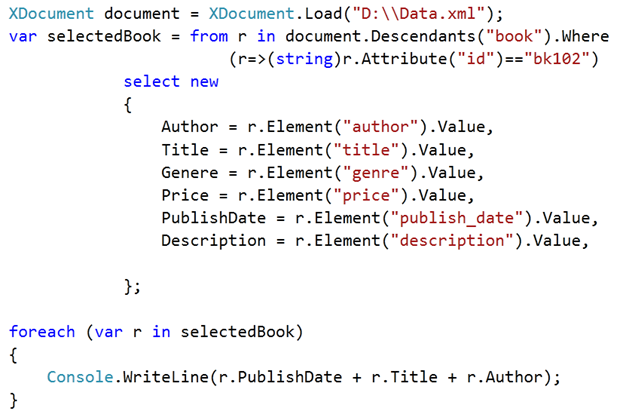
Fetching Attribute Value of a particular Book
Imagine you need to fetch author Id of a particular book with Id bk102. To do that you need to select as below,

Fetching all the Authors Name only
To fetch the entire author name, we need to execute below query.

For your reference full source code is as below,
Program.cs
using System;
using System.Linq;
using System.Xml.Linq;


namespace ConsoleApplication23
{
    class Program
    {
        static void Main(string[] args)
        {
            XDocument document = XDocument.Load("D:\\Data.xml");
            #region Fetch All the Books
            var books = from r in document.Descendants("book")
                        select new
                            {
                                Author = r.Element("author").Value,
                                Title = r.Element("title").Value,
                                Genere = r.Element("genre").Value,
                                Price = r.Element("price").Value,
                                PublishDate = r.Element("publish_date").Value,
                                Description = r.Element("description").Value,

                            };

            foreach (var r in books)
            {
                Console.WriteLine(r.PublishDate + r.Title + r.Author);
            }

            Console.ReadKey(true);
            #endregion

            #region Fetching a particular  Book
            var selectedBook = from r in document.Descendants("book").Where
                                   (r=>(string)r.Attribute("id")=="bk102")
                        select new
                        {
                            Author = r.Element("author").Value,
                            Title = r.Element("title").Value,
                            Genere = r.Element("genre").Value,
                            Price = r.Element("price").Value,
                            PublishDate = r.Element("publish_date").Value,
                            Description = r.Element("description").Value,

                        };

            foreach (var r in selectedBook)
            {
                Console.WriteLine(r.PublishDate + r.Title + r.Author);
            }
            Console.ReadKey(true);
            #endregion


            #region Fetching a particular  Book


            var selectedBookAttribute = (from r in document.Descendants("book").Where
                                        (r => (string)r.Attribute("id") == "bk102")
                                        select r.Element("author").Attribute("id").Value).FirstOrDefault();

            Console.WriteLine(selectedBookAttribute);

            Console.ReadKey(true);

            #endregion


            #region Fetching all Authors


            var allauthors = from r in document.Descendants("book")
                                         select r.Element("author").Value;
            foreach(var r in allauthors)
            {
                Console.WriteLine(r.ToString());
            }


            Console.ReadKey(true);

            #endregion


        }
    }
}
Output

I hope this post was useful. Thanks for reading 
Discover more from Dhananjay Kumar
Subscribe to get the latest posts sent to your email.
 Dhananjay Kumar
Nice Article
this is new comment
I’ve used liquid xml editor in the past as well, http://www.liquid-technologies.com/xml-editor.aspx, has anyone tried it and how do you think it compares?
Hello sirr..
you have saved my day by providing the above code….very thnx ..
Thanks it was helpful to you 🙂