Angular 16 adds a new future of making an @Input() decorated property REQUIRED, which means that to use that component, the value of the required property has to be passed.
@Input({required:true}) title? :string; To Understand it, let us assume that you have a component named ProductComponent with @Input() decorated properties as shown below,
const template = `
   <p>title : {{title}}  price : {{price}} </p>
`
@Component({
  selector: 'app-product',
  standalone: true,
  imports: [CommonModule],
  template : template
})
export class ProductComponent {

  @Input() title? :string;
  @Input() price? : string;

}
We are using ProductComponent inside AppComponent, as shown below.
import { Component } from '@angular/core';

const template = `
<app-product [title]="title"></app-product>
`
@Component({
  selector: 'app-root',
  template : template
})
export class AppComponent {
  title = "Pen";
}
As you notice here is that we are,
- Passing value to the title property
- Not passing value to the price property.
In the output, you can see that value of the title is printed, whereas the value of the price is rendered empty.
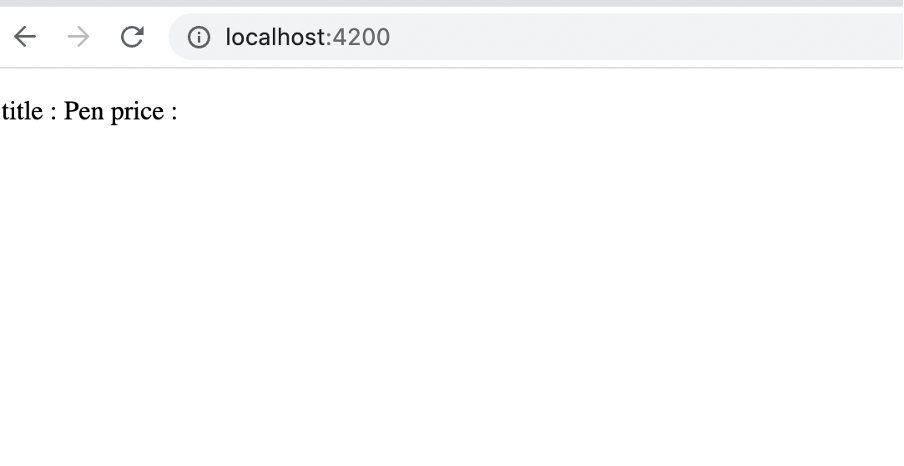
We can use the ProductComponent without passing the value of all input decorated properties, and Angular does not complain about that. Now let us say that we have a requirement that,
The price property is a required property to use the ProductComponent.
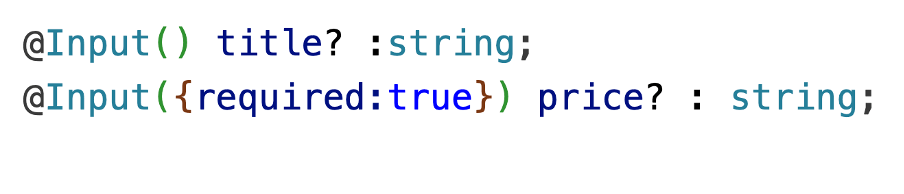
Starting Angular 16, we can make an @Input() decorated property as the required property. As you see Input interface has an optional, required boolean property.

We can use the required property to make an @Input() decorated property required, as shown below,
You can create a component with a combination of required and optional properties, as shown below,
import { Component, Input } from '@angular/core';
import { CommonModule } from '@angular/common';

const template = `
   <p>title : {{title}}  price : {{price}} </p>
`
@Component({
  selector: 'app-product',
  standalone: true,
  imports: [CommonModule],
  template : template
})
export class ProductComponent {

  @Input() title? :string;
  @Input({required:true}) price? : string;

}
And Angular complains about when you try using the ProductComponent without passing value for price property.

To use the ProductComponent, you must pass the value of the required @Input() decorated property as shown in the next code block,
import { Component } from '@angular/core';

const template = `
<app-product [title]="title" [price]="price"></app-product>
`
@Component({
  selector: 'app-root',
  template : template
})
export class AppComponent {
  title = "Pen";
  price = "100";
}
This way, you can make an @Input() decorated property as required. I hope you find this post helpful. Thanks for reading.
Discover more from Dhananjay Kumar
Subscribe to get the latest posts sent to your email.
 Dhananjay Kumar
Nice solution for required props, I think previously we have this weird way of using selectors to make input required. All those hacky ways of using directives just to impose the required attributes needs to go away.
Hi, I tried to use this method, but it doesn’t work for me. I’m using:
Angular CLI: 15.0.5
Node: 16.16.0
Package Manager: npm 9.6.5.
How can I make required an @Input in my component? Or is just possible in angular 16?
It works on Angular 16 +