While building an API, the client should receive a proper and descriptive HTTP response message for each request. The Web API provides a very simple approach to achieve this. A Web API controller action can return the following types:
- void
- HttpResponseMessage
- IHttpActionResult
- Other types, such as IEnumerable, object, collections, etc.
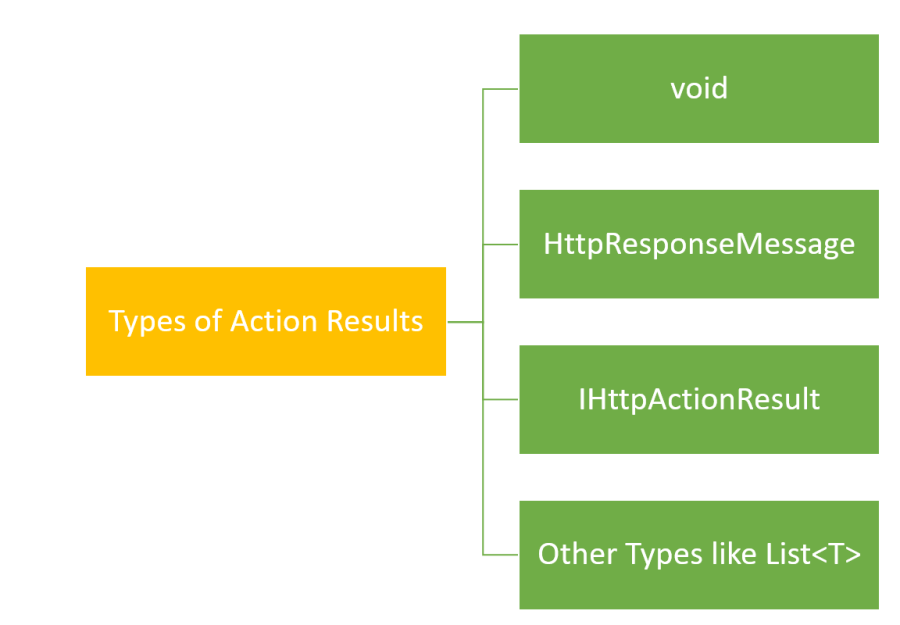
To test these different types and HTTP response message associated with them, I will use REST client tool Postman.
The void type
If the return type is set to void, Web API returns an empty HTTP response message with status code 204 means no content. Let us create an action, which returns void,
This file contains hidden or bidirectional Unicode text that may be interpreted or compiled differently than what appears below. To review, open the file in an editor that reveals hidden Unicode characters.
Learn more about bidirectional Unicode characters
| [Route("Log")] | |
| [HttpPost] | |
| public void LogSomething() | |
| { | |
| // do some logging | |
| } |
In the Postman, on performing HTTP Post operation, you will get response as shown next:

The HttpResponseMessage type
HttpResponseMessage type represents a HTTP response message which encapsulates data and the status code. Besides status code, you can also set other properties such that,
- Content
- Headers
- IsSucessStatusCode
- ReasonPhrase
- RequestMessage
- Version
You can return HttpResponseMessage with certain properties set as shown below:
This file contains hidden or bidirectional Unicode text that may be interpreted or compiled differently than what appears below. To review, open the file in an editor that reveals hidden Unicode characters.
Learn more about bidirectional Unicode characters
| [Route("Data")] | |
| [HttpGet] | |
| public HttpResponseMessage GetData() | |
| { | |
| HttpResponseMessage response = Request.CreateResponse(HttpStatusCode.OK); | |
| response.Content = new StringContent("hello geek97", Encoding.Unicode); | |
| response.ReasonPhrase = "Data is processed"; | |
| response.Headers.CacheControl = new CacheControlHeaderValue() | |
| { | |
| MaxAge = TimeSpan.FromMinutes(20) | |
| }; | |
| return response; | |
| } |
So, /api/data returns HtppResponseMessage, which has content, status code, Reason Phrase to be sent with the code, and cache control set. In the postman, you will get a response header as shown below. Also, you will notice that the status code contains Reason Phrase, “Data is processed.”
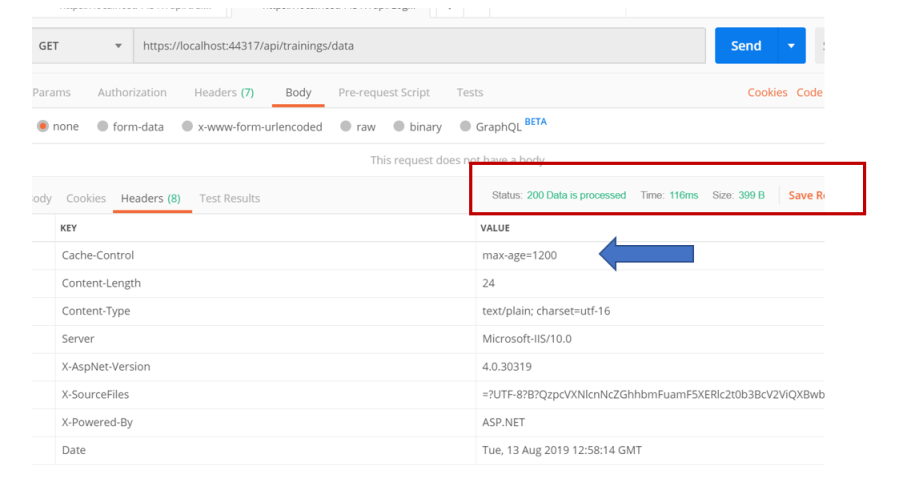
Also, the response would be cached for 20 milliseconds. You can also use the HttpResponseMessage type to send data into the response body. It uses media formatter to serialize the data in the format passed as the accept header of the HTTP request. For example, training data can be sent in the body of HttpResponseMessage as shown below,
This file contains hidden or bidirectional Unicode text that may be interpreted or compiled differently than what appears below. To review, open the file in an editor that reveals hidden Unicode characters.
Learn more about bidirectional Unicode characters
| [Route("Data")] | |
| [HttpGet] | |
| public HttpResponseMessage GetData() | |
| { | |
| var data = GetAllTrainings(); | |
| HttpResponseMessage response = Request.CreateResponse(HttpStatusCode.OK, data); | |
| response.Headers.CacheControl = new CacheControlHeaderValue() | |
| { | |
| MaxAge = TimeSpan.FromMinutes(20) | |
| }; | |
| return response; | |
| } |
Now, in the postman client, if you set Accept Header of Request to application/XML as shown in below image,
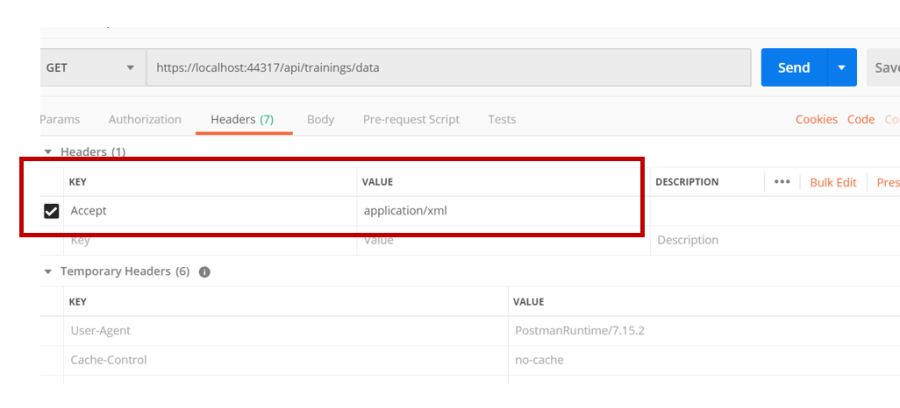
In the response body, you will get training data from the API serialized as XML,
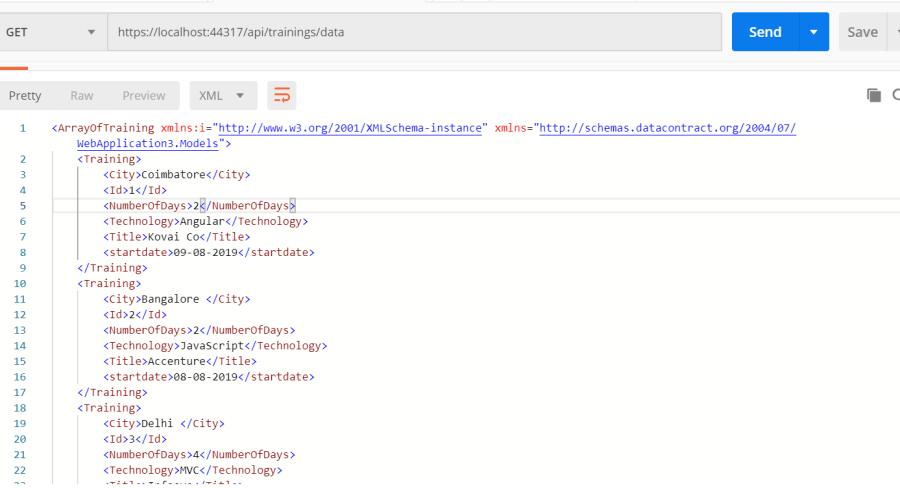
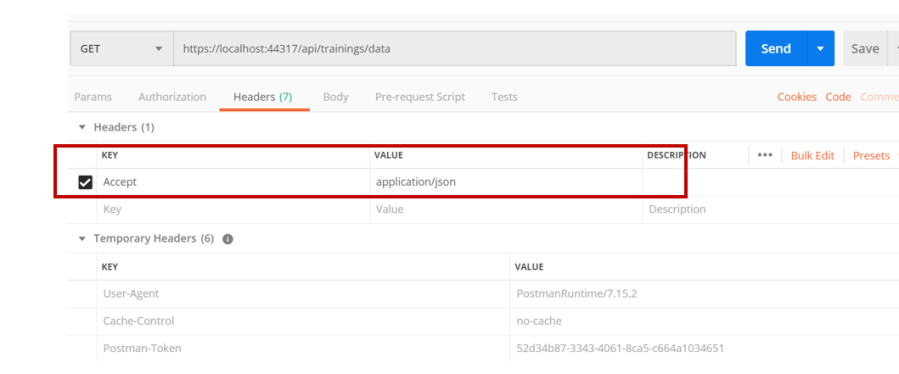
Whereas if you set Accept Header of Request to application/JSON as shown in below image,
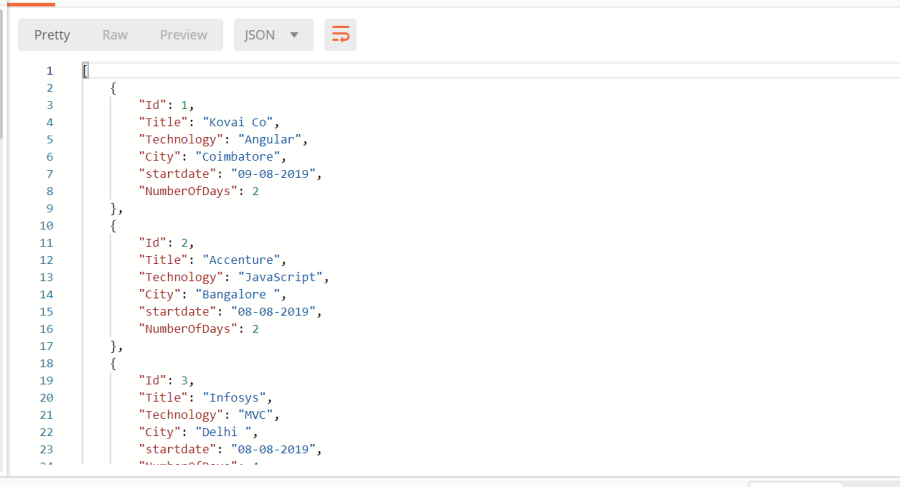
In the response body, you will get training data from the API serialized as JSON,
The IHttpActionResult type
The third type is IHttpActionResult, which was introduced in Web API 2.0. It provides, a factory to construct an HttpResponse message. It allows you to construct HTTP responses in a separate class, such that controllers can be better unit tested.
You can use IHttpActionResult in two ways:
- Implement it in a separate class to construct the HTTP response.
- Directly Use IHttpActionResult defined in System.Web.Http.Results namespace.
Often, you can use IHttpActionResult to return a particular data in this case training as shown below,
This file contains hidden or bidirectional Unicode text that may be interpreted or compiled differently than what appears below. To review, open the file in an editor that reveals hidden Unicode characters.
Learn more about bidirectional Unicode characters
| [Route("gettrainings/{id:int}")] | |
| [HttpGet] | |
| public IHttpActionResult GetTraining(int id) | |
| { | |
| var training = trainings.FirstOrDefault((t) => t.Id == id); | |
| if(training == null) | |
| { | |
| return NotFound(); | |
| } | |
| return Ok(training); | |
| } |
IHttpSActionResult from System.Web.Http.Results provides two methods to return result from the action.
- NotFound
- Ok
As you see, GetTraining action returns data wrapped in Ok method, or NotFound, if training with given id does not exist.
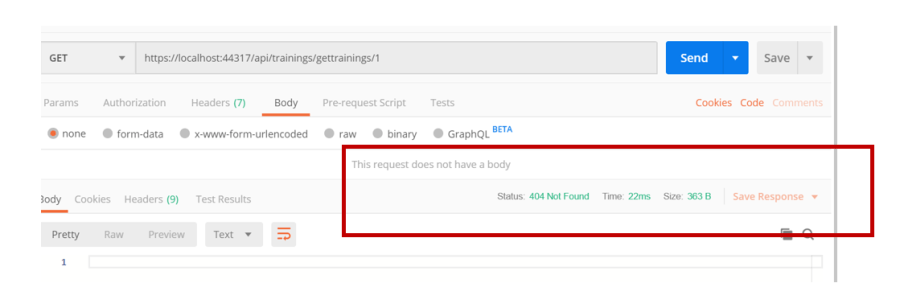
In the postman client, if you pass id value to 1 as shown in the below image, you will get an HTTP response with status 404 Not Found, as there is no training with id 1 exist.
You can also create an HTTP response message in a separate class. By doing that, you hide low-level details of HTTP response message construction from the controller class and can also reuse the code to construct an HTTP response message. To do this,
- Implement IHttpActionResult interface in the class
- Define ExecuteAsync method
We can implement IHttpActionResult to return a list of trainings in the HTTP response message, as shown below:
This file contains hidden or bidirectional Unicode text that may be interpreted or compiled differently than what appears below. To review, open the file in an editor that reveals hidden Unicode characters.
Learn more about bidirectional Unicode characters
| public class TrainingDataResponse : IHttpActionResult | |
| { | |
| List<Training> _data; | |
| HttpRequestMessage _request; | |
| public TrainingDataResponse(List<Training> data, HttpRequestMessage request) | |
| { | |
| _data = data; | |
| _request = request; | |
| } | |
| public Task<HttpResponseMessage> ExecuteAsync(CancellationToken cancellationToken) | |
| { | |
| var response = new HttpResponseMessage() | |
| { | |
| Content = new ObjectContent<List<Training>>(_data,new JsonMediaTypeFormatter()), | |
| RequestMessage = _request | |
| }; | |
| return Task.FromResult(response); | |
| } | |
| } |
We are, setting various properties of the HttpResponseMessage in the ExecuteAsync method. To return list of trainings as content of the HTTP response message, we are creating object of ObjectContent and using JSONMediaTypeForammter to convert list of training in a JSON format.
Now you can use newly created TrainingDataResponse in the controller class as shown below:
This file contains hidden or bidirectional Unicode text that may be interpreted or compiled differently than what appears below. To review, open the file in an editor that reveals hidden Unicode characters.
Learn more about bidirectional Unicode characters
| [Route("Data")] | |
| [HttpGet] | |
| public IHttpActionResult GetData() | |
| { | |
| var data = GetAllTrainings(); | |
| return new TrainingDataResponse(data.ToList(), Request); | |
| } |
Now you can test it in the postman client as shown in the image below,

Other Types
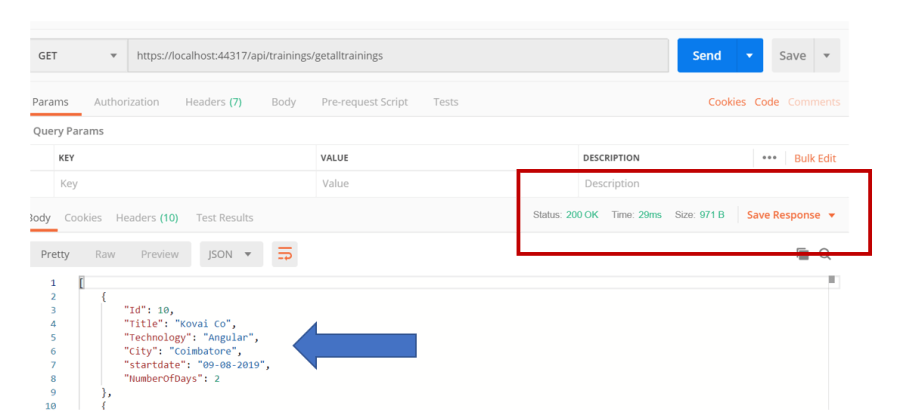
Besides the above three types, you can use any other types such as IEnuenrable<T>, List<T>, etc. To return them as HTTP response Web API uses the media formatter to serialize the returned data. Web API will write the serialized data in the body of the Http response, and set the status to 200.
Below action returns trainings, which is serialized by Web API,
This file contains hidden or bidirectional Unicode text that may be interpreted or compiled differently than what appears below. To review, open the file in an editor that reveals hidden Unicode characters.
Learn more about bidirectional Unicode characters
| public IEnumerable<Training> GetAllTrainings() | |
| { | |
| return trainings; | |
| } |
In the postman, you can test it as shown below:
Conclusion
These are the types supported by Web API. You should use them as per your requirement. For example, to construct low level details of HTTP response message, use the type HttpResponseMessage, and to send serialize data with status code 200, use the other types such as IEnumerable<T>.
Discover more from Dhananjay Kumar
Subscribe to get the latest posts sent to your email.
 Dhananjay Kumar