BingMapTask launcher is used to search a location and mark it on the Bing map. It is defined as below,
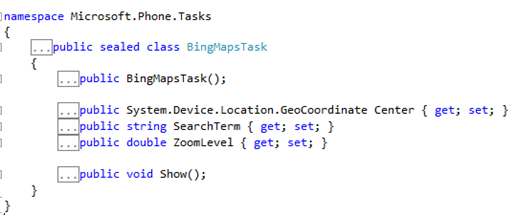
Search term need to be set as string. If geo coordinate of center is not provided then BingMapTask will search a location on basis of user’s current location.
Hospitals can be located and marked on the Bing map from user’s current location as below,
BingMapsTask bingMapsTask = new BingMapsTask();
bingMapsTask.SearchTerm = "hospital";
bingMapsTask.ZoomLevel = 2;
bingMapsTask.Show();
You can set the zoom level of the map as well. In this way you can search a location and mark that on Bing map.
I hope this post is useful. Thanks for reading.
Discover more from Dhananjay Kumar
Subscribe to get the latest posts sent to your email.
 Dhananjay Kumar
2 thoughts on “Code to search location on Bing Map”