In this post I will show you to upload stream to Azure BLOB.
Set the Connection String as below,
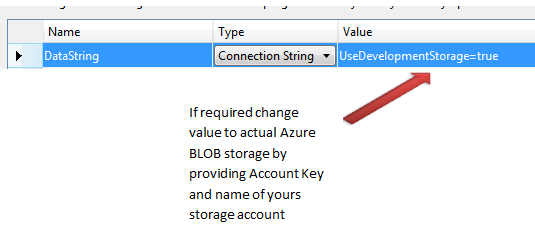
Function is as below,
public void UploadBlob(Stream s, string fileName, string containerName, string connectionString )
        {
            account = CloudStorageAccount.Parse(RoleEnvironment.GetConfigurationSettingValue(connectionString));
            blobClient = account.CreateCloudBlobClient();
            container = blobClient.GetContainerReference(containerName);
            blob = container.GetBlobReference(fileName);

            s.Seek(0, SeekOrigin.Begin);
            // set the required content type
            blob.Properties.ContentType = "image/jpeg";
            blob.SetProperties();
            BlobRequestOptions options = new BlobRequestOptions();
            options.AccessCondition = AccessCondition.None;
            blob.UploadFromStream(s, options);

        }
You need to set required content type. If you are uploading image then content type would be like below,

To use this function you need to pass ,
- Public container name
- BLOB name as filename
- Data connection string
I hope this quick code snippet was useful. Thanks for reading. 
Discover more from Dhananjay Kumar
Subscribe to get the latest posts sent to your email.
 Dhananjay Kumar
Just a code snippet and screenshot nothing else. You could describe it more. Looks funky.
what prompted you to use blob.UploadFromStream(s, options) and not blob.UploadFromStream(s) ?
did you find that overload is better in any way than simple UploadFromStream(stream)?