For a normal developer like me, had a great challenge working with WCF 3.x was configuration of End Points in config file. Developer had to add endpoints to setup a WCF service. In WCF 4, Defualt End Point is associated with the service, if we don’t configure any WCF endpoint.
To see how Default EndPoint works follow the steps below ,
Step1
Create a WCF service application.
Let us create two service contracts
IService1.cs
[ServiceContract]
 public interface IService1
 {

[OperationContract]
 string GetData();
 }
IService2.cs
[ServiceContract]
 public interface IService2
 {
 [OperationContract]
 string GetMessage();
 }
Now let us implement the service as below,
using System;
using System.Collections.Generic;
using System.Linq;
using System.Runtime.Serialization;
using System.ServiceModel;
using System.ServiceModel.Web;
using System.Text;

namespace WcfService1
{

 public class Service1 : IService1, IService2
 {
 public string GetData()
 {
 return "Hello From Iservice1 ";

}

public string GetMessage()
 {
 return " Hello From Iservice2";
 }

 }
}
Step 2
Now we will host this service in a console application, Create a new console application project.
Add reference of WCF service application project and also add reference of System.serviceModel in the console application project.
Note: There is no App.Config associated with console application.
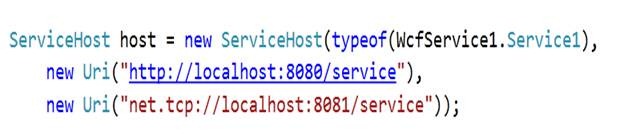
Here, we are registering two base addresses with the servicehost. One for http binding and other for nettcp binding.
Now we don’t have any configuration for the service EndPoint . ServiceHost will create default EndPoints .
Now ServiceHost will configure EndPoints for two base addresses
using System;
using System.Collections.Generic;
using System.Linq;
using System.Text;
using System.ServiceModel;
using System.ServiceModel.Description;
using WcfService1;

namespace ConsoleApplication1
{
 class Program
 {
 static void Main(string[] args)
 {

ServiceHost host = new ServiceHost(typeof(WcfService1.Service1),
 new Uri("<a href="http://localhost:8080/service">http://localhost:8080/service</a>"),
 new Uri("net.tcp://localhost:8081/service"));

host.Open();
 foreach (ServiceEndpoint se in host.Description.Endpoints)
 {
 Console.WriteLine("Address: " +  se.Address.ToString() +
 "  Binding: " + se.Binding.Name +
 " Contract :"+ se.Contract.Name);
 }

Console.ReadKey(true);
 }
 }
}
Output would be
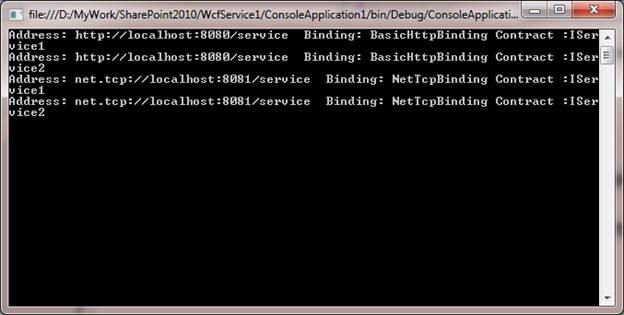
The default protocol mapping is as below,
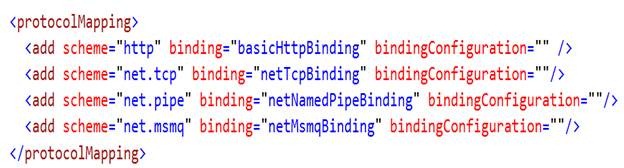
Since HTTP is mapped with basicHttpBinding , so we got the default EndPoint with basicHttpBinding.
Default EndPoint will only get created if there is not a single Endpoint configured. If we add any single EndPoint then all then there won’t be any default EndPoint get configured.
If we add one EndPoint as below,
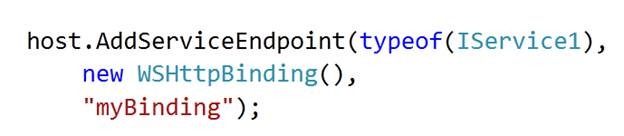
We added one service EndPoint and now the output we would get for below code ad below,
using System;
using System.Collections.Generic;
using System.Linq;
using System.Text;
using System.ServiceModel;
using System.ServiceModel.Description;
using WcfService1;

namespace ConsoleApplication1
{
 class Program
 {
 static void Main(string[] args)
 {

ServiceHost host = new ServiceHost(typeof(WcfService1.Service1),
 new Uri("<a href="http://localhost:8080/service">http://localhost:8080/service</a>"),
 new Uri("net.tcp://localhost:8081/service"));
 host.AddServiceEndpoint(typeof(IService1),
 new WSHttpBinding(),
 "myBinding");

host.Open();
 foreach (ServiceEndpoint se in host.Description.Endpoints)
 {
 Console.WriteLine("Address: " +  se.Address.ToString() +
 "  Binding: " + se.Binding.Name +
 " Contract :"+ se.Contract.Name);
 }

Console.ReadKey(true);
 }
 }
}
Output
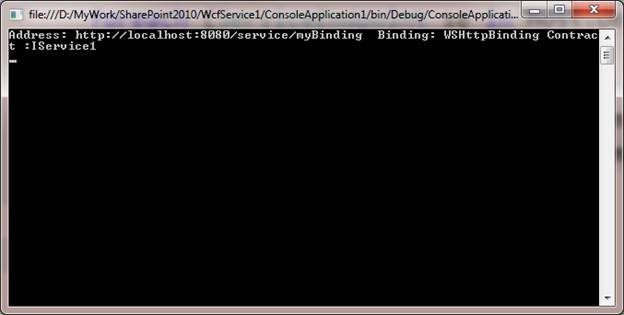
Now we see that if we configure a EndPoint then WCF does not support default Endpoints.
Discover more from Dhananjay Kumar
Subscribe to get the latest posts sent to your email.
 Dhananjay Kumar
One thought on “Default End Points in WCF 4.0”