If you have a Data Contract in your WCF service as below,
Student.cs
    [DataContract]
    public class Student
    {
        [DataMember]
        public string Name { get; set; }
        [DataMember]
        public string Address { get; set; }
        [DataMember]
        public string RollNumber { get; set; }
    }
On serialization properties of data contract will get serialized in alphabetical order. So at the client side serialized data contract will look like 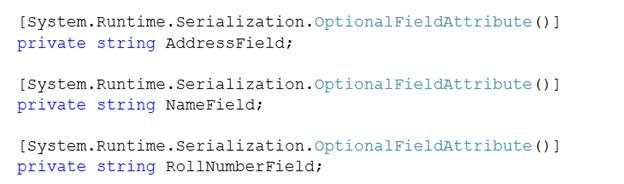 So we can see in serialized data contract at the client side properties are serialized in alphabetical order. Now if you want to manage the order of serialization, you need to use Order attribute of DataMember. Student.cs
    [DataContract]
    public class Student
    {
        [DataMember(Order=3)]
        public string Name { get; set; }
        [DataMember(Order=2)]
        public string Address { get; set; }
        [DataMember(Order=1)]
        public string RollNumber { get; set; }
    }

}
On serialization properties of data contract will get serialized in order specified at order attribute of data contract.
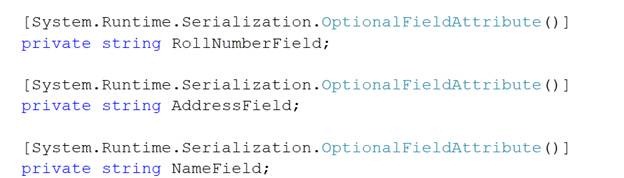
Note: To see the order of serialization click on ServiceReference1 in object explorer when you are adding that at the client side. You will get a class Student.cs
Two important points
1. If two properties are having same order then they will get serialized in alphabetical order.
2. In inheritance also DataContract will be serialized in alphabetical order , if explicitly order is not specified on DataMember.
Discover more from Dhananjay Kumar
Subscribe to get the latest posts sent to your email.
 Dhananjay Kumar
One thought on “Serialization order in Data Contract”