Objective
In this article, I am going to show, how we could achieve filtering and sorting in LINQ to object
I have created two classes for my explanation purpose. Student class is having details of students and Hostel class is having details of hostel. Both classes are having a properties HostelNumber common. I will be using this property to perform join operations in later articles. Both classes are as below.
Student.cs
| namespace LINQtoOBJECT1 { public class Student { |
Hostel.cs
| namespace LINQtoOBJECT1 { public class Hostel |
To create collection of students and hostels, I am creating two static functions.
Function to return collection of students.
| static List<Student> GetStudents(){ List<Student> students = new List<Student>{ new Student() { RollNumber = 1,Name =“Alex “ , Section = 1 ,HostelNumber=1 }, new Student() { RollNumber = 2,Name =“Jonty “ , Section = 2 ,HostelNumber=2 }, |
Function to return collection of hostels
| static List<Hostel> GetHostel(){
List<Hostel> hostels = new List<Hostel> |
Now have a look on both codes below, one is using LINQ and other is using LOOP to retrieve data from the list and print.
Note: I will be using above two classes and functions for my entire sample below.
Filtering in LINQ
In below code, I am filtering result. I am only fetching detail of student with RollNumber 1.
List<Student> lstStudents = GetStudents(); Student student = (from r in lstStudents where r.RollNumber == 1 select r).First(); Console.WriteLine(student.Name + student.RollNumber + student.HostelNumber + student.Section); |
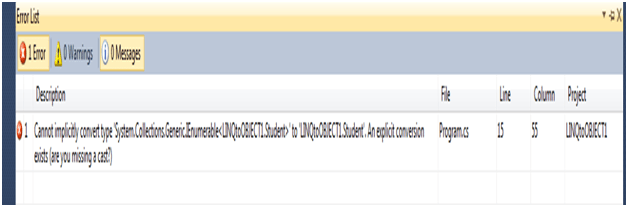
If you see closely in above LINQ query, I am using First clause. Because if I am returning the output in a Student type and default return type of LINQ is IEnumerable. If I modify the above LINQ as below
| Student student = (from r in lstStudents where r.RollNumber == 1 select r); |
At compile time we can expect below error,
When we run the above code
Output

Now if I want to have, named of all the students whose roll number is more than 3 and who resides in hostel number 2.
| List<Student> lstStudents = GetStudents(); IEnumerable<string> lstStudentName = from r in lstStudents where r.RollNumber > 3 && r.HostelNumber==2 foreach (string name in lstStudentName) |
In above LINQ query, I am applying both filtering and projection.
Output

Intermediate values
If I want to have intermediate values in my LINQ query then LET clause come into action. LET clause helps to reduce redundancy in WHERE clause.
| IEnumerable<string> lstStudentName = from r in lstStudents let condition = r.RollNumber where condition > 3 && r.HostelNumber== 2 select r.Name ; |
Let clause can be having complex statements.
Sorting in LINQ
OrderBy clause is used for purpose of sorting in LINQ.
Sorting a single property
Just before WHERE clause, OrederBy clause is used to sort the query result. In code Name of the students will be displayed in ascending order.
| List<Student> lstStudents = GetStudents(); IEnumerable<string> lstStudentName = from r in lstStudents let condition = r.RollNumber orderby r.Name where condition > 3 && r.HostelNumber== 2 select r.Name ; foreach (string name in lstStudentName) Console.WriteLine(name); |
Output

Sorting multiple properties
By putting comma between properties multiple properties can be sorted. Sorting will be done left to right. For roll number property I am sorting in descending order. This can be achieved by using keyword DESCENDIG. By default sorting is ascending.
List<Student> lstStudents = GetStudents(); IEnumerable<Student> lstStudentName = from r in lstStudents let condition = r.RollNumber orderby r.Name,r.RollNumber descending foreach (Student name in lstStudentName) Console.WriteLine(name.RollNumber + name.Name); |

Conclusion
In next part, I will be explaining Grouping. I hope this article was useful to you. Thanks for reading.
Discover more from Dhananjay Kumar
Subscribe to get the latest posts sent to your email.
 Dhananjay Kumar
This is just what i need! Thanks!