Objective
This article will give an explanation on; how to create a XML tree using Functional Construction method of LINQ to XML.
What is Functional Construction?
Functional Construction is ability to create a XML tree in a single statement. LINQ to XML is being used to create XML tree in a single statement.
The features of LINQ to XML enables functional construction are as follows
-
The XElement class constructor takes various types of arguments
- For child element takes another XElement as argument.
- For attribute of element takes XAttribute as argument.
- For text content of element takes simple string as argument.
- For child element takes another XElement as argument.
- For complex type of content pass parameter as Array of Objects.
- If an object implements IEnumerable(T) , then the collection is enumerated. If the collection contains XElement or XAttributes objects then result of LINQ query can be passing as parameter to XElement constructor.
Sample #1
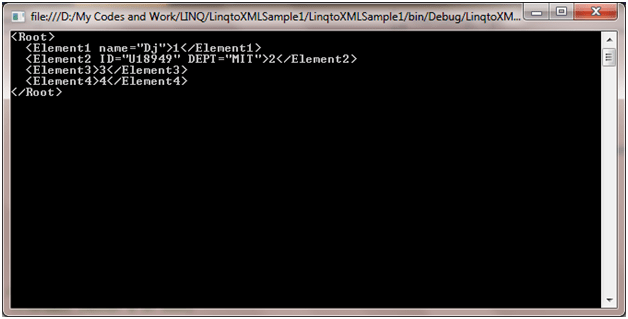
Here we are creating a XML tree by passing XElement as child element and XAttribute as attribute to one of the element.
| XElement xmltree = new XElement(“Root”,
new XElement(“Element1”, new XAttribute(“name”, “Dj”), 1), |
Please do not forget to add System.XML.LINQ namespace. Output in a console print may look like
Sample # 2
Now we will try to use feature #3 (Discussed above) that if object implements IEnumerable(T) we can pass result of a LINQ query as parameter .
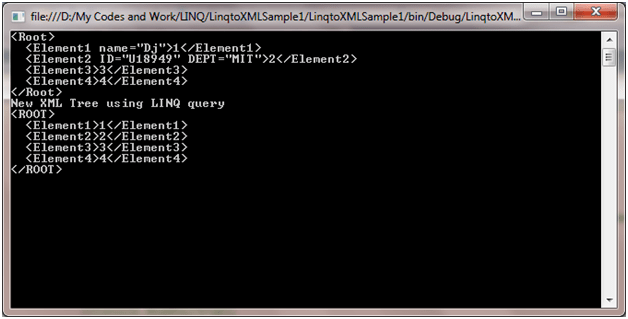
So let us say, that in above XML Tree (Created as sample1), we are retrieving child elements with content 3 and 4 and passing the result as parameter of constructor of XML element to create XML tree.
| XElement xmltree = new XElement(“Root”,
new XElement(“Element1”, new XAttribute(“name”, “Dj”), 1), ); Console.WriteLine(xmltree); |
If you see the above code, the second XML tree, we are passing LINQ query result as parameter of XElement. We will get expected output as below.
Conclusion
In this article, I explained about FUNCTIONAL CONSTRUCTION way of creating XML TREE. Thanks for reading.
Discover more from Dhananjay Kumar
Subscribe to get the latest posts sent to your email.
 Dhananjay Kumar
One thought on “LINQ to XML Part # 3: Functional Construction of XML Tree”