Please read post at below link for recommended way to create table,
https://debugmode.net/2011/10/12/creating-azure-table-using-cloudtableclient-createtableifnotexist/
In this post I will show you three simple steps to create Azure Table.
Let us say you want to create Azure table called Employee with following columns
- EmployeeID
- EmployeeName
- EmployeeSalary
Step 1: Create Entity class
First step is to create entity class representing employee.
Each row of azure table contains at least below columns
- Row key
- Partition Key
- Time Stamp
And custom columns along with above columns. So Employee table will be having all together below columns
- Row Key
- Partition Key
- Time Stamp
- EmployeeID
- EmployeeName
- EmployeeSalary
To represent entity class, we need to create a class inheriting from class TableServiceEntity. EmployeeEntity class will be as below,
using System;
using Microsoft.WindowsAzure.StorageClient;

namespace Test
{
public class EmployeeEntity : TableServiceEntity
{
public EmployeeEntity(string partitionKey, string rowKey)
: base (partitionKey,rowKey )
{

}
public EmployeeEntity()
: base()
{
PartitionKey = "test";
RowKey = String.Empty;
}

public string EmployeeID { get; set; }
public string EmployeeName { get; set; }
public int EmployeeSalaray { get; set; }
}
}
There is couple of points worth discussing about above class.
- It inherits from TableServiceEntity class
- It is having two constructors
- Passing rowkey and partitionkey as string value to base constructor
- Custom columns are as the public property of the class.
Step 2: Create Data Context class
Once Entity class is in place, we need to create DataContext class. This class will be used to create the table.
using System;
using Microsoft.WindowsAzure.StorageClient;
using Microsoft.WindowsAzure;
using System.Linq;

namespace Test
{
public class EmployeeContext : TableServiceContext
{
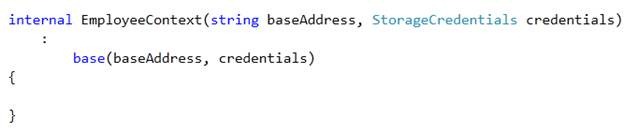
internal EmployeeContext(string baseAddress, StorageCredentials credentials)
:
base(baseAddress, credentials)
{

}

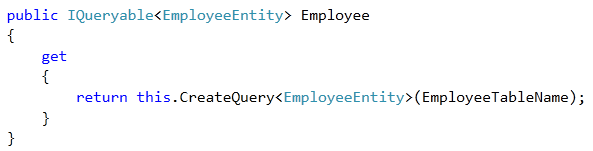
internal const string EmployeeTableName = "Employee";
public IQueryable<EmployeeEntity> Employee
{
get
{
return this.CreateQuery<EmployeeEntity>(EmployeeTableName);
}
}
}
}
There are couples of points worth discussing about above code
- It inherits from TableServiceContext class
- In constructor we are passing credentials
- In constructor we are passing base address to create the table.
- Table name is given inline in the code as below; Employee is name of the table we want to create.

- We need to add IQueyable property to create query.
Step 3: Creating Table
To create table we need a very simple code.
- Create the account. In below code DataConnectionString is name of the connection string. This could be pointing to local storage or Azure Tables.
- We are creating table from Data Model. Passing EmployeeContext class as parameter.
using System;
using Microsoft.WindowsAzure.StorageClient;
using Microsoft.WindowsAzure;
using System.Linq;
using Microsoft.WindowsAzure.ServiceRuntime;

namespace Test
{
public class CrudClass
{
public class CrudClass
{
public void CreateTable()
{
CloudStorageAccount account = CloudStorageAccount.Parse(RoleEnvironment.GetConfigurationSettingValue("DataConnectionString"));
CloudTableClient.CreateTablesFromModel(typeof(EmployeeContext
), account.TableEndpoint.AbsoluteUri, account.Credentials);

}

}
}
When you call CreateTable() method of CrudClass , it will create Employee table for you in Azure table.
I hope this post was useful. Thanks for reading 
If you find my posts useful you may like to follow me on twitter http://twitter.com/debug_mode or may like Facebook page of my blog http://www.facebook.com/DebugMode.Net If you want to see post on a particular topic please do write on FB page or tweet me about that, I would love to help you
Follow @debug_modeDiscover more from Dhananjay Kumar
Subscribe to get the latest posts sent to your email.
 Dhananjay Kumar
FYI. The following is documented:
— It’s now recommended that you use the CreateTable or CreateTableIfNotExist method to create a table, rather than CreateTablesFromModel. It is not necessary to create a custom class that is derived from TableServiceContext in order to work with Table service data.
http://msdn.microsoft.com/en-us/library/microsoft.windowsazure.storageclient.cloudtableclient.createtablesfrommodel.aspx