This is the second part of the NestJS learning series. Part 1 covered setting up the Nest project.
In this part, we will cover the following topics:
- Connecting to the SQL Azure database
- Setting up Connection String
- Endpoints for CRUD operations
Setting Up the Database
MySQL Azure has a database called nomadcoder. In this article, we will connect to this database and perform CRUD operations on a company table. We will create the book table from the code itself.
To connect to SQL Azure, you’ll need a connection string, which can be found on the database’s overview page.

Click on Connection Strings, then go to the ODBC tab to find the connection string for the Nest API.
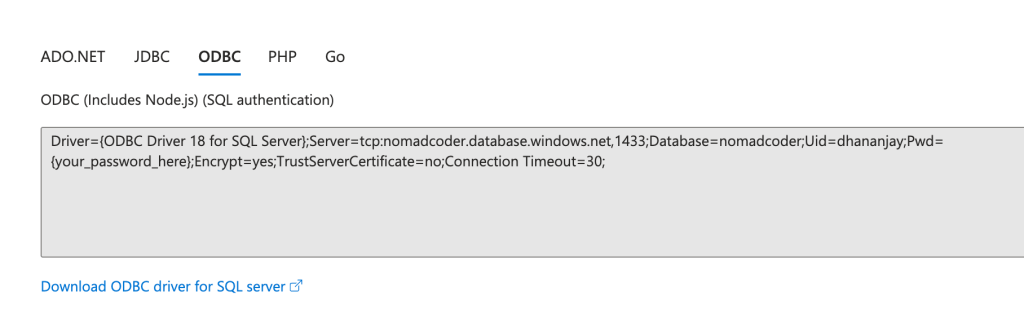
To connect to SQL Azure, you must install the ODBC driver on your computer. If it’s not installed, you can download it.
We will use TypeORM to connect to SQL Azure, so install the dependencies listed below in your project.
Read in full article here
https://www.telerik.com/blogs/learning-nestjs-part-2-connecting-database
Thanks for reading.
Discover more from Dhananjay Kumar
Subscribe to get the latest posts sent to your email.
 Dhananjay Kumar