By default, Angular Services are Singleton. When you create a service using the CLI command,
ng g s App
Angular creates a service named AppService.
This file contains hidden or bidirectional Unicode text that may be interpreted or compiled differently than what appears below. To review, open the file in an editor that reveals hidden Unicode characters.
Learn more about bidirectional Unicode characters
Singleton means Angular creates only one object of the AppService, regardless of how many places you use it. However, if you re-provide the service in another component or a module and use it inside, Angular will create separate objects for them.
As shown below , if you again provide the AppService in ProductComponent; Angular creates a new object of the AppService, and provides it to the ProductComponent and all its child components.
This file contains hidden or bidirectional Unicode text that may be interpreted or compiled differently than what appears below. To review, open the file in an editor that reveals hidden Unicode characters.
Learn more about bidirectional Unicode characters
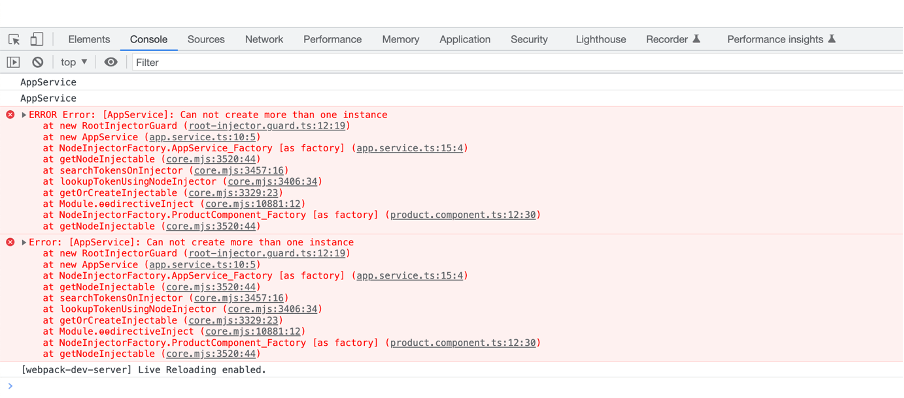
Sometimes you may have a requirement to prevent a service from being instantiated more than once. As you have seen that if you re-provide a service, Angular creates a new object of that. You can prevent this, as shown.
To prevent a service to be re provided and getting more than one objects being created, you can create a injector guard.
This file contains hidden or bidirectional Unicode text that may be interpreted or compiled differently than what appears below. To review, open the file in an editor that reveals hidden Unicode characters.
Learn more about bidirectional Unicode characters
After creating injector, modify the service as shown below.
This file contains hidden or bidirectional Unicode text that may be interpreted or compiled differently than what appears below. To review, open the file in an editor that reveals hidden Unicode characters.
Learn more about bidirectional Unicode characters
 Dhananjay Kumar