In Angular, content projection is used to project content in a component. Let’s take a closer look at how it works:
Content projection allows you to insert a shadow DOM in your component. To put it simply, if you want to insert HTML elements or other components in a component, then you do that using concept of content projection. In Angular, you achieve content projection using < ng-content >< /ng-content >. You can make reusable components and scalable application by right use of content projection.
To understand content projection, let us consider GreetComponent as shown in the code listing below:
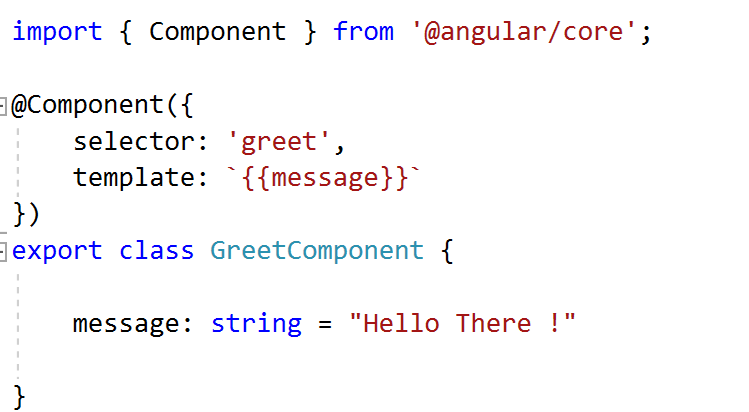
Now if you use GreetComponent in another component, and want to pass a greeting message from the parent component, then you should use the @Input() decorator. This way, a modified GreetComponnet will look like the listing below:

Using the @Input() decorator, you can pass a simple string to the GreetComponnet, but what if you need to pass different types of data to the GreetComponent such as:
- Inner HTML
- HTML Elements
- Styled HTML
- Another Component etc.
To pass or project styled HTML or another component, content projection is used. Let us modify the GreetComponent to use content projection in this code:

We are using to project content in the GreetComponent. When you use the GreetComponent, you’ll pass content as shown below:

Read full article on the Infragistics blog
Discover more from Dhananjay Kumar
Subscribe to get the latest posts sent to your email.
 Dhananjay Kumar