MarketPlaceSearch Task launcher is used to launch Marketplace client application with the searched result set in the criteria. It helps to search to marketplace from the application.
MarketPLaceSearchTask is defined as below,
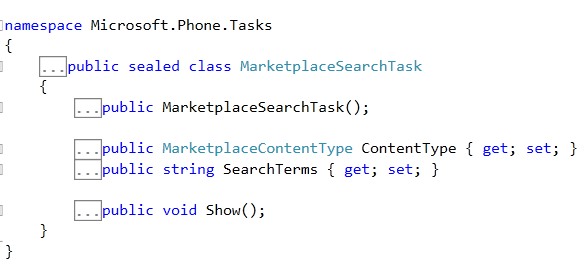
You can see in the definition that, you can set MarketplaceContentType and SearchTerms. MarketPlaceContentType is defined as below,
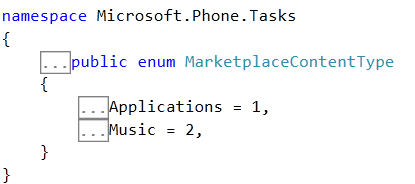
So it can take either Application or Music as value. Now if you want to search music in market place then you can do that as below,
MarketplaceSearchTask task = new MarketplaceSearchTask();
task.ContentType = MarketplaceContentType.Music;
task.SearchTerms = "Waiting for Tonight";
task.Show();
You will get Market place search application launched as below,

If you want to search any application like debugmode , you can search as below,
MarketplaceSearchTask task = new MarketplaceSearchTask();
task.ContentType = MarketplaceContentType.Applications;
task.SearchTerms = "debugmode";
task.Show();
You will get Market place search application launched as below,
![clip_image001[6]](https://debugmode.net/wp-content/uploads/2012/01/clip_image00162.png "clip_image001[6]")
In this way you can use MarketPlaceSearchTask. I hope this post is useful. Thanks for reading.
Follow @debug_mode
Discover more from Dhananjay Kumar
Subscribe to get the latest posts sent to your email.
 Dhananjay Kumar
2 thoughts on “MarketPlaceSearchTask in Windows Phone”