In this post I will discuss Toggle Switch Button. This comes as part of Silverlight toolkit for Windows Phone 7 and you get it from here

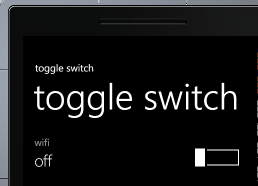
To work with Toggle Switch, you need to add namespace
xmlns:tool="clr-namespace:Microsoft.Phone.Controls;assembly=Microsoft.Phone.Controls.Toolkit"
You can use ToggleSwitch as below,
<tool:ToggleSwitch x:Name="tglSwitch"
Header="wifi"
Checked="tglSwitch_Checked"
Unchecked="tglSwitch_Unchecked"/>
You can set Header and Content of the Toggleswitch. If you want you can very much templateaize Header and Content.
There are four events attached with Toggle Switch.

You can handle events as below,
void tglSwitch_Click(object sender, RoutedEventArgs e)
{
MessageBox.Show("Its Clicked");

}

void tglSwitch_Indeterminate(object sender, RoutedEventArgs e)
{
MessageBox.Show("Its intermidiate");
}

private void tglSwitch_Checked(object sender, RoutedEventArgs e)
{
tglSwitch.Content = "on";
}

private void tglSwitch_Unchecked(object sender, RoutedEventArgs e)
{
tglSwitch.Content = "off";
}
In this way you can work with ToggleSwitch . I hope this post is useful. Thanks for reading.
Follow @debug_modeDiscover more from Dhananjay Kumar
Subscribe to get the latest posts sent to your email.
 Dhananjay Kumar
2 thoughts on “How to work with ToggleSwitch in Windows Phone 7”