I installed Windows Azure SDL V 1.3 . I tried to create a Hello World Azure Application.
I pressed F5 and error I got as below ,
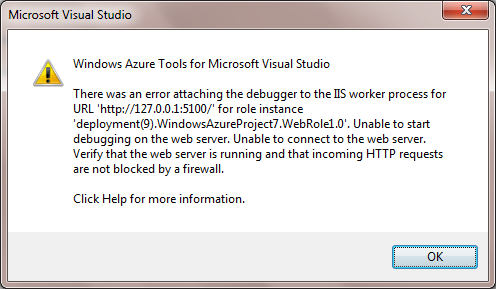
I tried Ctrl+F5 ; running without debugger and did not get above exception but got service unavailable error in the browser
On this particular exception a very good discussion I found here
Option 1
First suggestion was to check whether, there are two folders in C:\Windows\Microsoft.NET\Framework64 for V4.0 and rename one of the folders. I checked and I found I had only one folder for v4.0.30319 so this suggestion did not work for me.
Option 2
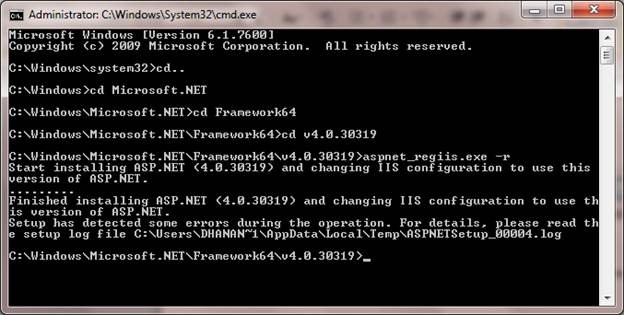
Second suggestion was the open the command prompt and run aspnet_regiis.exe –r. I tried and again I was not lucky.
Option 3
Third suggestion was to change the target framework from V4.0 to v3.5. I did that and was unlucky once again.
Option 4
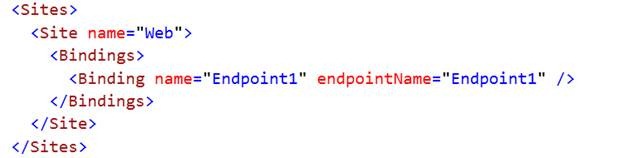
Fourth suggestion was to change delete the Sites element from the ServiceDefinition.csdef file. I was unlucky once again.
Option 5
Fifth option was to test whether, a normal web Application with target framework 4.0 is getting published successfully in IIS or not? I tried that and I was able to publish. So my IIS was working fine.
I got frustrated and restarted and system and found everything working, I did not get that debugger exception. I have no idea what happened but this was my experience with this popular exception.
Discover more from Dhananjay Kumar
Subscribe to get the latest posts sent to your email.
 Dhananjay Kumar
One thought on “Windows Azure for developers Task4: Error Attaching the debugger in Windows Azure SDK 1.3”