To see how could we do navigation between pages in Windows 7 Phone application , I am going to create a new page . I am giving name of the page as NewPage.Xaml
Now we will navigate as

Let us put a button on MainPage.xaml and on click of that button we will navigate tp NewPage.Xaml
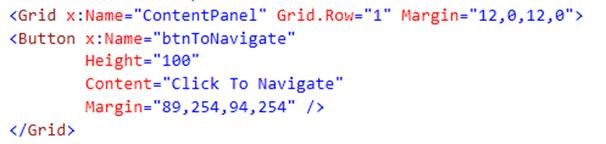
On click event,
void btnToNavigate_Click(object sender, RoutedEventArgs e)
 {

 NavigationService.Navigate(new Uri("/NewPage.xaml", UriKind.Relative));

 }
There is one more way to navigate to other page
void btnToNavigate_Click(object sender, RoutedEventArgs e)
 {

 PhoneApplicationFrame frame = Application.Current.RootVisual as PhoneApplicationFrame;
 frame.Navigate(new Uri("/NewPage.xaml", UriKind.Relative));
 }
Now if we want to pass value from one page to another page then,
void btnToNavigate_Click(object sender, RoutedEventArgs e)
 {
 string param1="Value1";
 string param2="Value2";
 NavigationService.Navigate(new Uri(string.Format("/NewPage.xaml?val1={0}&val2={1}",param1 ,param2), UriKind.Relative));

 }
In above code, we are passing param1 and param2 to next page.
Now to fetch these values from query parameter on NewPage.Xaml.cs , we need to override the onNavigated() method.
And code would be like
 protected  override void OnNavigatedTo(System.Windows.Navigation.NavigationEventArgs  e)
 {
 base.OnNavigatedTo(e);
 string value1 = "";
 string value2 = "";
 NavigationContext.QueryString.TryGetValue("val1", out value1);
 NavigationContext.QueryString.TryGetValue("val2", out value2);
 MessageBox.Show(value1);
 MessageBox.Show(value2);
 }
Discover more from Dhananjay Kumar
Subscribe to get the latest posts sent to your email.
 Dhananjay Kumar
Hi,
Its really helpful.
Thanks