Objective
In this article, I am going to show,
- How to Shut Down a machine
- How to Log Off a machine
- How to forced log off a machine
- How to restart a machine using c#
To perform our task, very first let us create a windows application project. On form drag and drop four buttons for four different operations. After design form will look like below
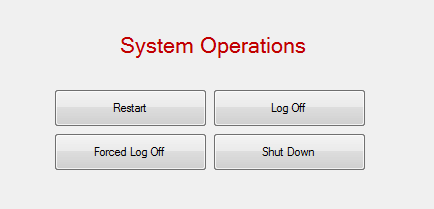
Navigate to code behind of form and add reference of System.Runtime.InteropServices
Add a static extern method to Form.cs

Log off the System
On click event of Log Off button, call ExitWindowsEX method with proper flag. For log off operation flag value is 0.

Forced Log off the System
On click event of Forced Log Off button, call ExitWindowsEX method with proper flag. For Forced log off operation flag value is 4.

Shut Down the System
On click event of Shut down button, call ExitWindowsEX method with proper flag. For shut down operation flag value is 1.

Restart the System
On click event of Restart button, call ExitWindowsEX method with proper flag. For Restart operation flag value is 2.

Now when you run the application all system operation should be performed.
For your reference full source code is given here
Form.cs
using System;
using System.Collections.Generic;
using System.ComponentModel;
using System.Data;
using System.Drawing;
using System.Linq;
using System.Text;
using System.Windows.Forms;
using System.Runtime.InteropServices;
namespace SystmShutDownApp
{
public partial class Form1 : Form
{
public Form1()
{
InitializeComponent();
}
private void Form1_Load(object sender, EventArgs e)
{
}
[DllImport(“user32.dll”)]
public static extern int ExitWindowsEx(int operationFlag, int operationReason);
private void btnRestart_Click(object sender, EventArgs e)
{
ExitWindowsEx(2, 0);
}
private void btnLogOff_Click(object sender, EventArgs e)
{
ExitWindowsEx(0, 0);
}
private void btnForcedLogOff_Click(object sender, EventArgs e)
{
ExitWindowsEx(4, 0);
}
private void btnShutDown_Click(object sender, EventArgs e)
{
ExitWindowsEx(1, 0);
}
}
}
Thanks for reading. I hope post was useful. Happy Coding.
Discover more from Dhananjay Kumar
Subscribe to get the latest posts sent to your email.
 Dhananjay Kumar
Error 1 ‘SystmShutDownApp.Form1.Dispose(bool)’: no suitable method found to override C:\Documents and Settings\Samiran Saha\My Documents\Visual Studio 2005\Projects\WindowsApplication16\WindowsApplication16\Form1.Designer.cs 14 33 WindowsApplication16
the shutdown and restart operations are not working for me.???
sir we want a code to shutdown and schedule the system using mobile .pls send it for me
The Shutdown and Restart really does not work at all, only the lock, logoff and force-logoff works.