Objective
This article will give basic 7 theatrical points on SharePoint List definition.
-
When we create a new site in SharePoint, it gets created as instance of SharePoint Site Definition. Each instance of Site Definition is having List Definitions. So when we create a list in SharePoint site, it gets created as instance of List Definition of the site.
-
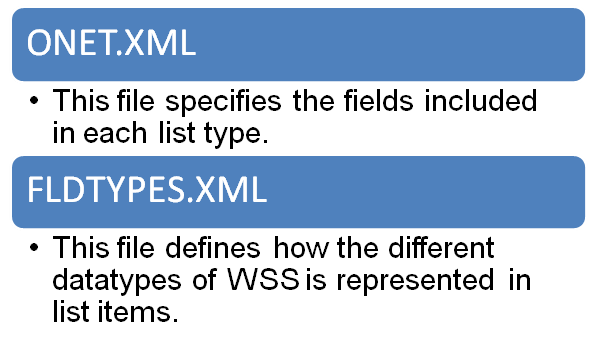
Each list gets its definition from the two files. These files are applied globally to the site.
Two files are as below,
-
Each List folder is having 5 files. They are as follows
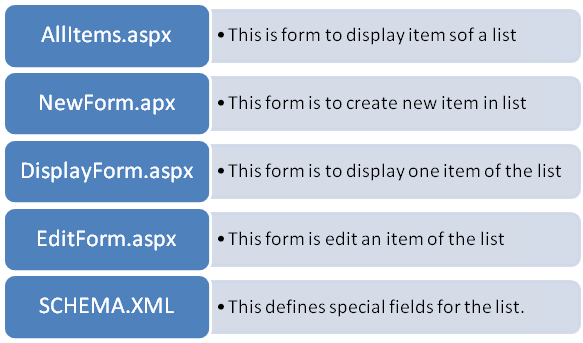
These files can be found at
Local_Drive:\Program Files\Common Files\Microsoft Shared\web server extensions\60\TEMPLATE\Locale_ID\Site_Definition\LISTS
directory - All the three XML files for a list use CAML language to define how list instance should be created.
- Never modify content of FLDTYPES.XML.
Because wrong updating or modification in this file can break the entire site definition for particular front end server.
- All ASPX page of a list item contains same Page Directive, Meta Data, Script, and Server controls.
-
Each ASPX page contains a table with three rows.
|
TOP Navigation |
|
|
Title |
|
|
Left Navigation |
Content |
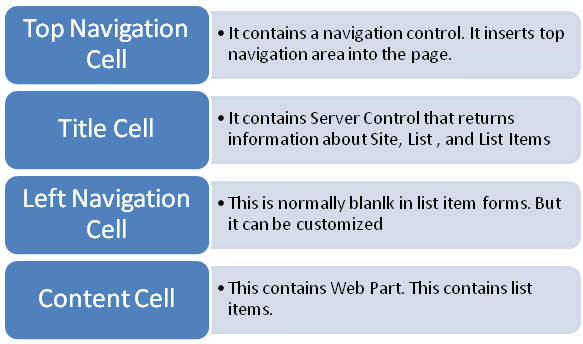
In next articles; I will show how to customize above four parts of a SharePoint List form. Thanks for reading.
Discover more from Dhananjay Kumar
Subscribe to get the latest posts sent to your email.
 Dhananjay Kumar
this is venkat ponnam from andharapradesh (ap) completing mca
i never fiend these type of explanation regrading list plese continu sir…………thanks once again
It’s difficult to find any other website which lists these type of quick points about Sharepoint List. These sort of explanation will help a lot. Thanks a lot.