Today while working I came across a requirement to consume a REST Service. To consume REST Service application had to provide username and password. Initially I thought it should be easier task and I tried consuming REST Service as below,
WebClient proxy = new WebClient();
NetworkCredential credential = new NetworkCredential("username", "password");
proxy.Credentials = credential;
proxy.DownloadStringCompleted += new DownloadStringCompletedEventHandler(proxy_DownloadStringCompleted);
proxy.DownloadStringAsync(new Uri("http://localhost:2572/Service1.svc/GetStudents"));
In completed event accessing returned data as below,
void proxy_DownloadStringCompleted(object sender, DownloadStringCompletedEventArgs e)
{
string result = e.Result;
MessageBox.Show(result);

}
When I tried running application I got below exception
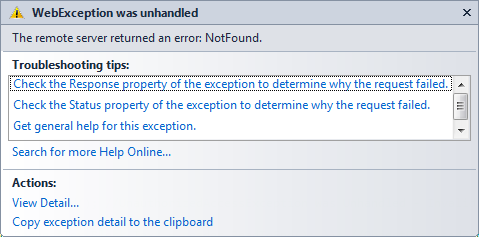
WebClient is the main reason behind above exception. WebClient is unable to pass credential to the service. Better approach to call REST Service with Basic authentication is to use HttpWebRequest class.
HttpWebRequest client = (WebRequest.CreateHttp(new Uri("http://localhost:2572/Service1.svc/GetStudents"))) as HttpWebRequest;
NetworkCredential cred = new NetworkCredential("username", "password");
client.Credentials = cred;
var result = (IAsyncResult)client.BeginGetResponse(ResponseCallback, client);
MessageBox.Show(responseData);
And in Responsecallback method parse result as below. In this case I am calling the service on different thread.
private void ResponseCallback(IAsyncResult result)
{
var request = (HttpWebRequest)result.AsyncState;
var response = request.EndGetResponse(result);
using (var stream = response.GetResponseStream())
using (var reader = new StreamReader(stream))
{

var contents = reader.ReadToEnd();
Dispatcher.BeginInvoke(() => { responseData = contents; });
}
}
You should be using HttpWebRequest to consume the REST Service with Basic authentication. I hope this post is useful. Thanks for reading.
Follow @debug_modeIf you find my posts useful you may like to follow me on twitter http://twitter.com/debug_mode or may like Facebook page of my blog http://www.facebook.com/DebugMode.Net If you want to see post on a particular topic please do write on FB page or tweet me about that, I would love to help you.
Discover more from Dhananjay Kumar
Subscribe to get the latest posts sent to your email.
 Dhananjay Kumar
i am getting error with responseData and MessageBox.Show(responseData)